Quarry
The Quarry is Enginarium's large-scale automated mining system.
Power
- Internal buffer: 100 EJ
- Minimum useful input: 5 EJ/t
- Mining cost: 100 EJ per block
- Frame construction cost: 25 EJ per frame segment
- Speed scales with live available EJ input
The configured efficiency curve ranges from slower operation at low power to approximately 6 seconds per 100 blocks at 2,000 EJ/t.
Default size
Without marker sizing, the default mining interior is 9 × 9.
The Quarry block sits outside the rear of the frame. The default physical frame is larger than the mining interior and supports the gantry and drill assembly.
Marker sizing
Use four Markers to define a custom quarry area.
- Place four markers around the desired area.
- Activate the marker layout.
- Use the Quarry on the activated marker layout.
- The Quarry adopts the marked size.
- The markers are removed and can be collected.
Construction
The Quarry clears the work area and constructs its frame before normal drilling begins. Temporary construction beams are removed after frame completion.
Output
The Quarry can output mined items and collected fluids through compatible pipes. If item output is blocked or storage is full, drilling pauses rather than throwing items into the world.
Chunk loading
The Quarry includes chunk-loading support so an active operation can continue when its work area would otherwise unload.
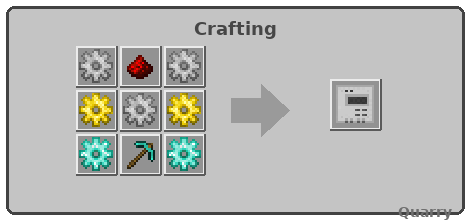
Output: 1 × Quarry
IRI
GIG
DPD
| Symbol | Ingredient |
|---|---|
I |
Iron Gear |
R |
Redstone |
G |
Gold Gear |
D |
Diamond Gear |
P |
Diamond Pickaxe |